
Welcome to Tips & Tricks!
This page is your go-to resource for helpful insights and advice designed to make your experience smoother and more enjoyable. Whether you're a new member learning the ropes or a seasoned pro looking for a refresher, you'll find useful content on website navigation, club etiquette, curling tips, and more.
Check back often — we're always adding new tips to help you get the most out of your membership!
WEBSITE
The main difference between using a computer and a phone or tablet to access the website comes down to screen size, layout, and functionality:
💻 On a Computer:
- Larger screen allows you to see more content at once.
- Full navigation menus are usually visible without needing to tap or expand.
- Easier for tasks that involve typing, detailed viewing, or managing multiple windows.
- Some features or layouts may be optimized for desktop use.
📱 On a Phone or Tablet:
- Touchscreen navigation means tapping and swiping instead of clicking.
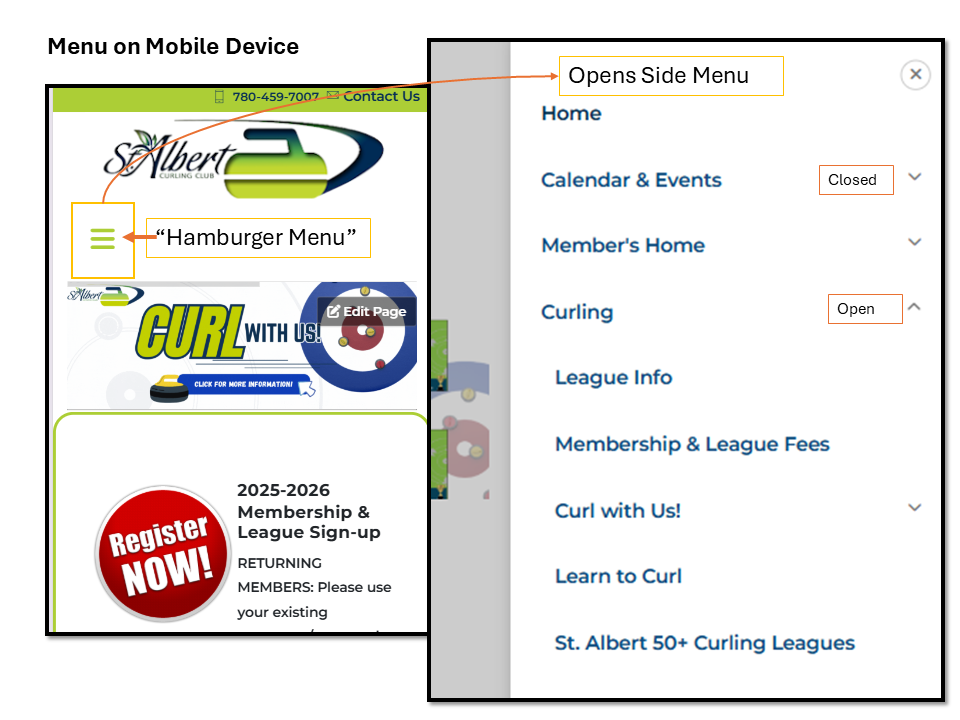
- Menus and content are condensed or hidden behind icons (like a hamburger menu).
- Mobile-responsive design adapts the layout to fit smaller screens.
- Some features (like drag-and-drop or larger tables) may be simplified.
We recommend using a computer for tasks like managing signups, exploring new features, or viewing detailed content — but the mobile site works great for quick access on the go!
Common Questions:
- AHHHH! The menu on my phone doesn't work!
Here's a handy video that talks about the mobile menu - open the "hamburger" menu and ensure that you are clicking on the drop down arrows, THEN clicking on the link.
- What are the steps for registration, where do I review this?
There are 6 important steps - it is the first page you see when you try to register. You can find it here if you are logged in or watch the video that takes you through the steps.